


Quick Start Guide SONO Hub Calibration
Disclaimer: The user is required to observe and adhere to the currently applicable instruction manuals for all Vemaventuri products utilized.
01 Preparation
Note: Calibration means telling the SONO Hub how this concrete behaves so the moisture result matches the real mix. You are not changing the concrete — you are adjusting the preset so the device interprets this mix correctly.
Requirements:
• Batch report or mix design with wet raw density & cement content from a trusted source
• Best-fit CHAR choice for this mix
• Known water value or reference method (DARR / kiln-dry) for G-Set checks
Calibration Workflow:
1) Open "Measure"
2) Tap "Adjust Parameters"
3) Fine-tune (G-Set + Density + Char + Cement)
4) Save Preset
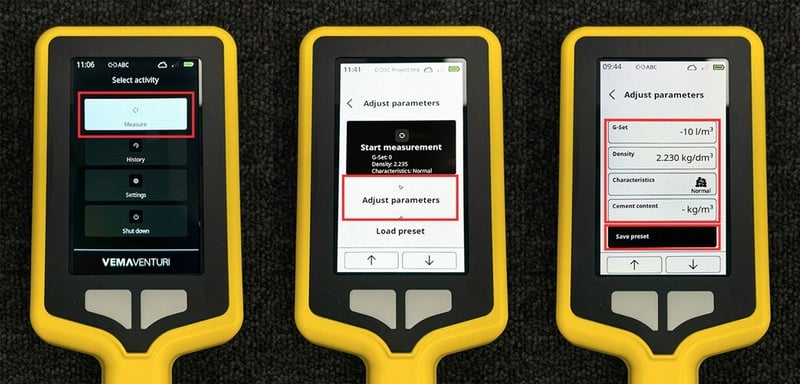
Preset tip: Save separate presets for different mixes, aggregate sources, and seasons. One G-Set that works in winter may not work in hot, dry summer conditions.
02 Parameters
G-Set
- What it does: Corrects for water held in aggregate that is not immediately available for hydration.
- Think of it like: Aggregate is a wet sponge. Some water stays trapped and cannot be used right away.
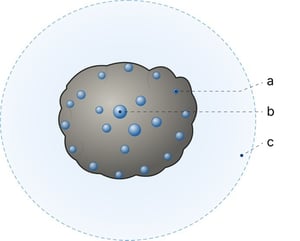
a: Surface water
b: Core water
c: Free water
- Standard method: Compare SONO with known water content from correctly mixed concrete with surface-dried aggregates, or with a precise DARR / kiln-dried value, and use that difference to set the baseline G-Set.
- Site adjustment: The first value is the baseline, but in running site use it can vary as aggregate moisture changes. If results shift, investigate possible batching or sampling causes before adjusting.
- Watch for: Recycled aggregate, limestone / chalky aggregate, dredged stone, wet stockpiles, rain, and seasonal change.
CHAR
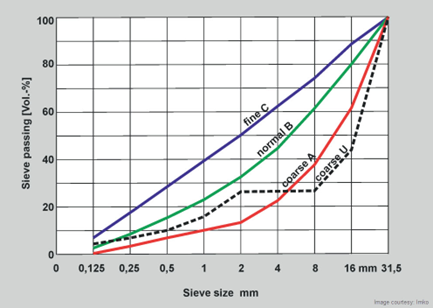
- What it does: Tells the device how fine or coarse the aggregate grading is.
- Quick rule: Fine = sandy / mortar-rich. Normal = typical ready-mix. Coarse = larger stone and less mortar. Special = site-specific after verification.
- Why it matters: It changes how the device interprets aggregate composition and surface water.
- Best practice: Choose the closest gradation first, then verify with a few control checks.
Raw Density (wet)
- What it does: Helps the radar interpret how the signal travels through the concrete
- Use: Enter the wet raw density from a vibration test, mix calculation, delivery data, or verified lab value.
- Why it matters: Wrong density can shift the moisture result even if the mix recipe is unchanged.
- Watch for: Compaction differences, aggregate proportion changes, or using an old value for a new mix.
Cement Content
- Label note: Use the cement value required by the applicable local standard for water-cement ratio calculation. May refer to cement-equivalent binder content rather than pure cement only.
- Standard mixes: Use the declared cement content from the batch report or approved mix design.
- Example (EU / EN 206-1): 314.4 cement + (50 fly ash × 0.4 = 20) + 17.5 silica fume = 351.9 kg/m³ cement-equivalent content.
- Important: This value affects the calculated W/C ratio only and does not change the measured water content.
03 G-Set Method
Baseline Calibration
-
Start with the manual/reference method for normal use.
-
Use known water content from correctly mixed concrete with surface-dried aggregates, or a precise DARR/ kiln-dried value.
-
Set the correct CHAR and Raw Density.
- Measure the fresh sample and compare SONO with the reference value.
- Use the difference as the baseline G-Set, then save that value as the preset for this mix.
Site adjustment
- Use the saved baseline G-Set as the starting point on site.
- If the readings shift, first investigate possible causes in the concrete or batching process.
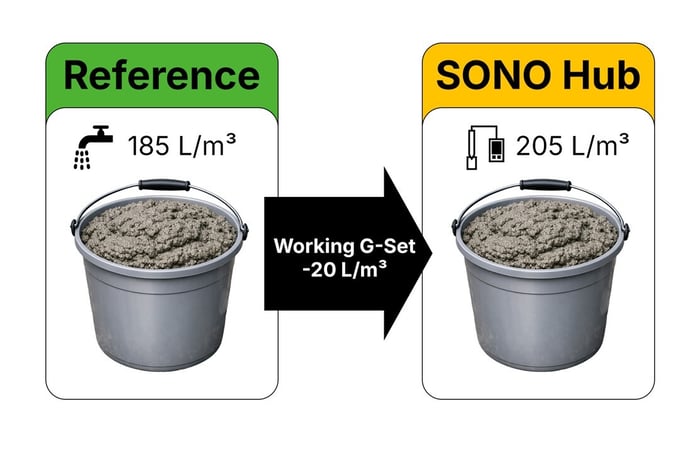
- If site conditions are consistently different from the reference condition, adjust the working G-Set from the baseline and verify on the next sample.
Example: SONO = 205 L/m³ and reference = 185 L/m³. The SONO result is 20 L/m³ high, so reduce the working G-Set by 20 L/m³ and verify on the next sample.
Site adjustment checks:
Use site adjustment checks when:
-
truck-to-truck values drift unusually
-
lab and site results do not match
-
season, stockpile, or aggregate source conditions change sharply
-
recycled or very porous aggregate is used
Note: Reference methods set the starting G-Set. If measured water is outside expected limits, investigate potential causes with the batching plant before changing G-Set